Etinysoft Software Free Video Converter Home  |  Contact  | 简体中文
 
 
Current Page:Home >Support >Video to HD WMV
       HD WMV Converter
 
total video converter hd
$75.95
Convert Video to HD WMV with eTinysoft Total Video Converter HD

eTinysoft Video Converter HD is a professional yet easy-to-use video converter. With the HD Video Converter, you can easily convert Video, AVI, MKV, DVD, MPEG, MP4, H.264, DivX, RMVB, WMV, MOV, FLV, VOB, ASF, 3PG, 3G2, SWF, XviD, VOB, TS, MPEG-2, etc. to HD WMV and save to playback on your PSP, iPod, iPhone, swf, flv, DVD, VCD, Xbox360, PS3. Blu Ray player and other media devices!

As a new upgraded version, the HD Video Converter also can Convert between AVCHD(.mts, .m2ts), HD AVI, H.264 TS, HD MPEG-2 TS, HD WMV, HD FLV, HD MOV, HD Xvid, HD Divx, HD MKV, HD Mp4 etc. Besides, You can even capture games to video files that supporting various video formats and directly download flash videos (winXP) from video-sharing website like YouTube. All those offer you bran-new experience.


WMV HD Converter for Windows


Now, Follow the step by step guide, you will find the conversion is so easy and fast.
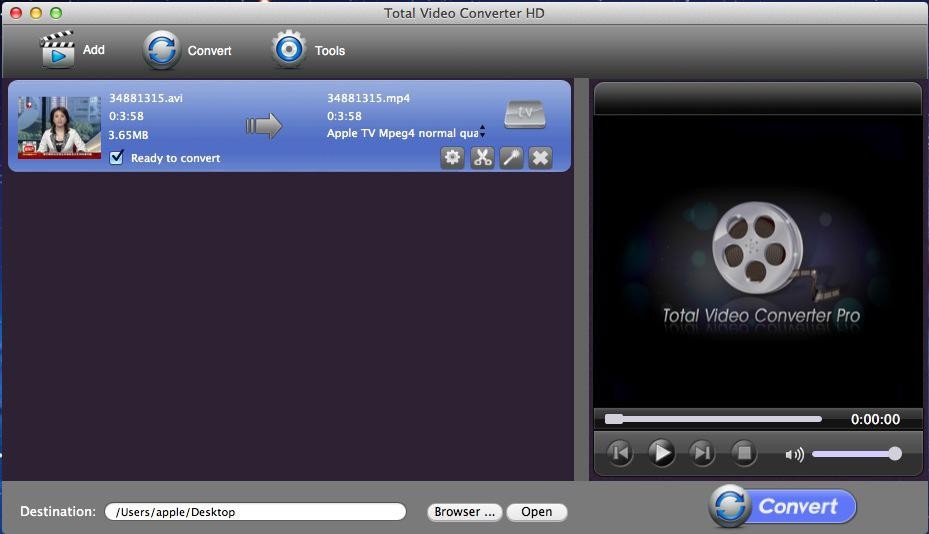
Step 1: Lauch Total Video Converter HD and Click the “New Task” button to load the video files

Tips:eTinysoft TVC-HD supports batch conversion, so you can load several video files at one time.

total video converer hd image

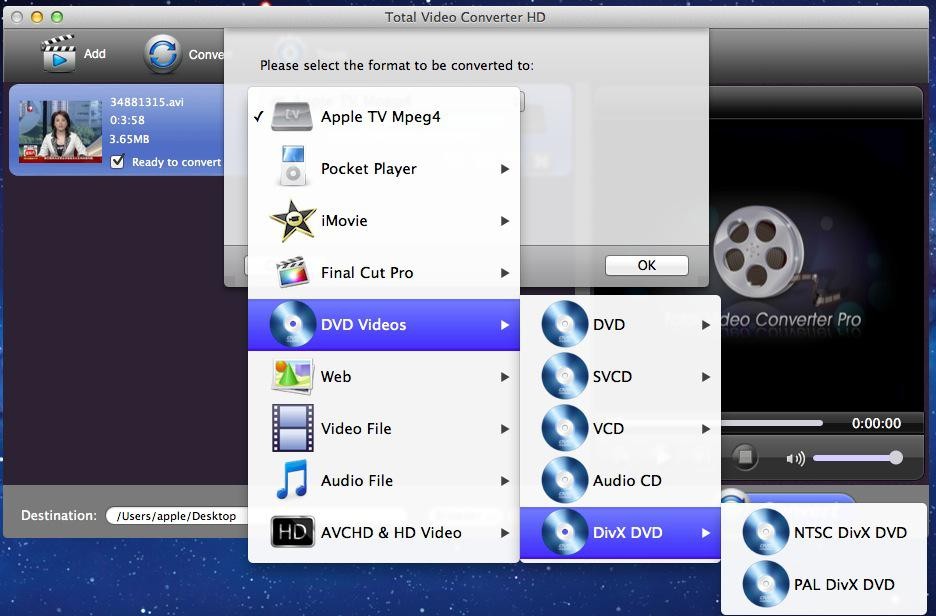
Step 2: Select output formats.
After loaded the files, then it will pop a “Please select the format to be converted to” window, here you can select “AVCHD& HD Video” and then click “MKV-HD Video” button.
Tips: This HD Video Converter allows setting different output formats according to different files.
Step 3: Customize output parameters. (optional)
This HD wmv conversion program allows you to customize the “Filter” and “Settings” on the left top corner. It helps you set relative “Audio Option”, “Video Option”, “Video Resize” and “Video Crop& pad”.
 
Step 4: Choose the output destination (optional)
This step you can choose the output file destination below the preview monitor and setting “profile”: normal quality, high quality and lower quality.
 
Step 5: Start the avi to mp4 conversion
OK, just click the “Convert Now” button and wait for a few minutes.


eTinysoft hd video converter
Hot Products
Total Video Converter HD
Photo MovieTheater
iNetGet 2.2.1 for Mac
Magic Swf to Avi Tool
Value HD Guides
Convert Video to H.264 TS
Convert Video to Mpeg-2 ts
Convert Video to WMV-HD
Convert Video to MKV-HD
Convert Video to DivX-HD
Convert Video to Xvid-HD
Convert Video to MOV-HD
Convert Video to FLV-HD
Convert Video to MP4-HD
Value HD Guides
Convert MP4 to AVI
Convert MPEG to AVI
Convert DVD to AVI
Convert MKV to AVI
Convert WMV to AVI
Convert Videos to PSP
Convert Videos to Xbox
Convert Videos to iPod
Convert Videos to Zune
Convert AVI to MP4
Convert FLV to MP4
Convert DVD to MP4
Convert WMV to MP4
Convert Videos to MP4
Convert DVD to Divx
Convert AVI to Divx
Convert AVI to MPEG
Convert DVD to MPEG
Convert WMV to MPEG
Convert AVI to MOV
Convert FLV to MOV
Convert WMV to MOV
Convert MPEG to MOV
Convert AVI to MKV
Convert DVD to MKV
Convert MP4 to SWF
Convert Xvid to AVI

About usPhoto slideshow softwareTotal Video ConverterVideo DirectorAvi to DvdSwf to AviPowerpoint Video ConverterFree Video Converter
Copyright © 2010 etinysoft.com. All rights reserved.