Etinysoft Software Free Video Converter Home  |  Contact  | 简体中文
 
 
Current Page:Home >Support >MKV to AVI Conversion
 
How to convert mkv to avi with eTinysoft Total Video Converter HD?
 

eTinysoft Video Converter HD is an all-in-one powerful HD video converter that makes it easy for you to convert almost all video formats for playback on ipod, iPhone, PSP, Xbox360, Zune, mobile phone and other portable media devices.

As a professional video converter software, eTinysoft Video Converter HD helps you to convert mkv to avi at high speed with perfect output quality. With its user-friendly interface, this mkv to avi Converter also supports batch conversion and setting relative output parameters before starting to convert mkv to avi.

In addition to mkv to avi conversion, it can also convert between other video formats including MPEG, DVD, WMV, FLV, MKV, 3GP, RMVB, ASF, MOV, TS, VOB, DivX, XviD, AVI, GIF etc.

Need no special skill, here it will show you the step-by-step guide to convert mkv to avi video formats, it is quite easy.


Convert mkv to avi Step 1: Lauch Total Video Converter HD and load the MKV video files

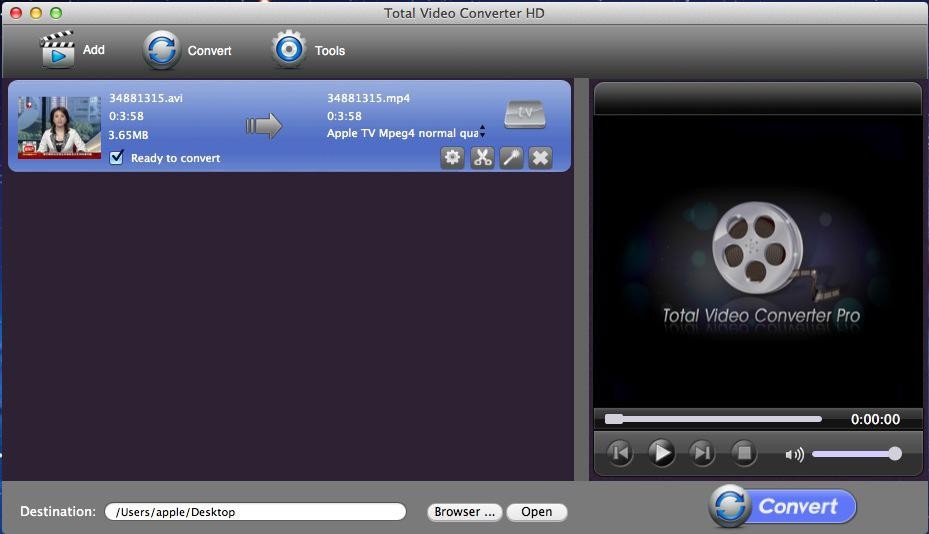
Click the “New Task” button, and import the mkv video files you want to convert to the program. eTinysoft TVC-HD supports batch conversion, so you can load several Mkv video files at one time.
Tips: you can preview the video files in the right preview monitor.

total video converter hd

Convert mkv to avi Step 2: Select output formats.

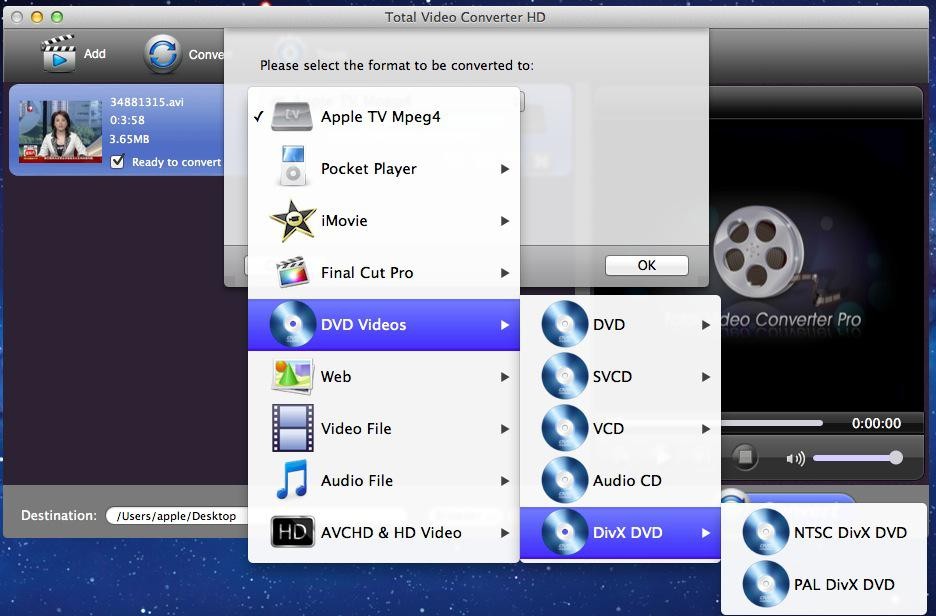
After loaded the files, then it will pop a “Please select the format to be converted to” window which allows you to select various output formats, here you can select “video file” and then click “AVI” button.
Tips: This MKV to AVI Converter allows setting different output formats according to different files.
eTinsoft TVC-HD image 2

Convert mkv to avi Step 3: Customize output parameters.
(optional)
This MKV to AVI Converter allows you to customize the “Filter” and “Settings” on the left top corner. It helps you set relative “Audio Option”, “Video Option”, “Video Resize” and “Video Crop& pad”.
 
Convert mkv to avi Step 4: Choose the output destination
This step you will choose the output file destination below the preview monitor and setting “profile”, here you can select normal quality, high quality and lower quality.
 
Convert mkv to avi Step 5: Start the mkv to avi conversion
OK, just click the “Convert Now” button and wait for a few minutes.
eTinysoft TVC-HD image 5


Get more information at:

                                     Total Video Converter HD: The powerful HD Videos and Blu-ray Moive Converte

  Buy Total Video Converter HD ($75.95)
  Download


eTinysoft hd video converter
Hot Products
Total Video Converter HD
Photo MovieTheater
iNetGet 2.2.1 for Mac
Magic Swf to Avi Tool
Value HD Guides
Convert Video to H.264 TS
Convert Video to Mpeg-2 ts
Convert Video to WMV-HD
Convert Video to MKV-HD
Convert Video to DivX-HD
Convert Video to Xvid-HD
Convert Video to MOV-HD
Convert Video to FLV-HD
Convert Video to MP4-HD
Top Tips
Convert MP4 to AVI
Convert MPEG to AVI
Convert DVD to AVI
Convert MKV to AVI
Convert WMV to AVI
Convert Videos to PSP
Convert Videos to Xbox
Convert Videos to iPod
Convert Videos to Zune
Convert AVI to MP4
Convert FLV to MP4
Convert DVD to MP4
Convert WMV to MP4
Convert Videos to MP4
Convert DVD to Divx
Convert AVI to Divx
Convert AVI to MPEG
Convert DVD to MPEG
Convert WMV to MPEG
Convert AVI to MOV
Convert FLV to MOV
Convert WMV to MOV
Convert MPEG to MOV
Convert AVI to MKV
Convert DVD to MKV
Convert MP4 to SWF
Convert Xvid to AVI

About usPhoto slideshow softwareTotal Video ConverterVideo DirectorAvi to DvdSwf to AviPowerpoint Video ConverterFree Video Converter
Copyright © 2010 etinysoft.com. All rights reserved.