How to extract lossless video and audio from a video file?
Do you have some videos that you want to convert them into to lossless format and want to extract the video and audio from? But how can I do if I want to extract a lossless audio(MP3,M4A,AC3,MPG,ETC) from my video on Mac? And when I download flash FLV video from YouTube, Google, Yahoo and want to convert them into MP3 for my MP3 player, what program should I use?
This tutorial is show you how to extract lossless video and audio from a video file on Mac OS X.
Preparation: Download Total Video Converter for Mac here
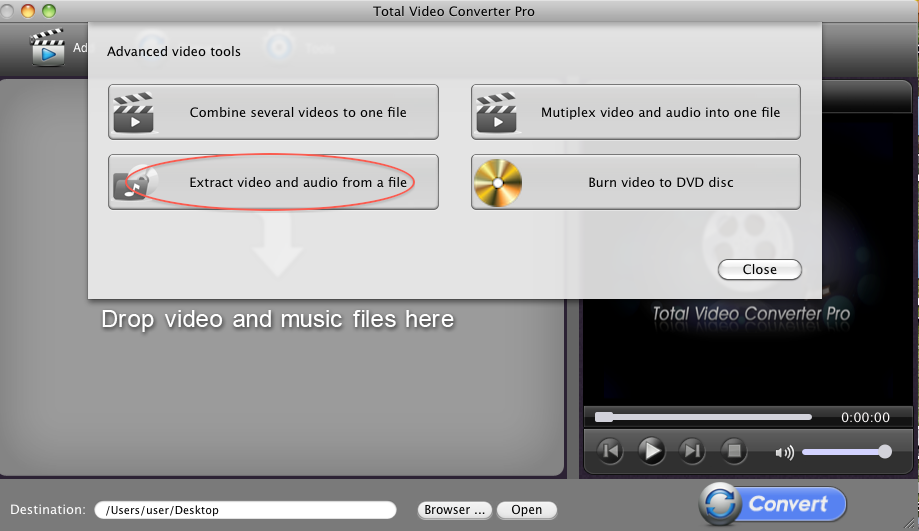
Step 1: Lauch Total Video Converter for Mac and select "Extract video and audio from a file" tool
Click "Tools" button, you will get below UI, and select "Extract video and audio from a file" tool.
Step 2: Import the video
Click "...." button to import one video file that you want to extract audio and video from. Then you will see below with detailed information of "Duration", "Video codec", "Audio codec".
And you can custom the output format of video and audio by click the arrow at the right of the window. 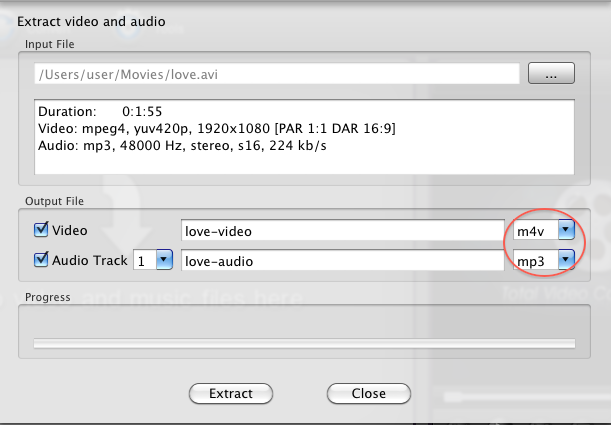
Step 3: Run "Extract" operation
The last step, click the "Extract" button to extract lossless video and audio from video file. A few minutes later, the destination folder will open automatically when the conversion is completed.
 Download Total Video Converter for Mac Download Total Video Converter for Mac
More related topics:
|