Why Rip YouTube Videos on Mac?
YouTube is filled with eye-catching, captivating, and helpful information. It is a place to change your mood and entertain yourself — you can watch dramas, serials, movies, recipes, science and technology, interviews, funny videos, interesting techniques, and share your favorites with the audience, all within an online community.
You can even upload your own videos or share existing videos on other social networking websites. However, when we say "online," it means you cannot access these videos where Internet facilities are limited — such as on an airplane or at sea. For this reason, you need a video download application to rip videos from YouTube on Mac beforehand for offline viewing.
For your reference, Total Video Downloader is a wonderful video download software designed exclusively for Mac users. You can free download this downloader right now and start ripping YouTube videos in minutes!
Compatible with Mac OS X 10.8+, EL Capitan, Yosemite, Mavericks, iMac, Mac mini, MacBook Air, MacBook Pro, and Apple Silicon M1/M2/M3 Macs.
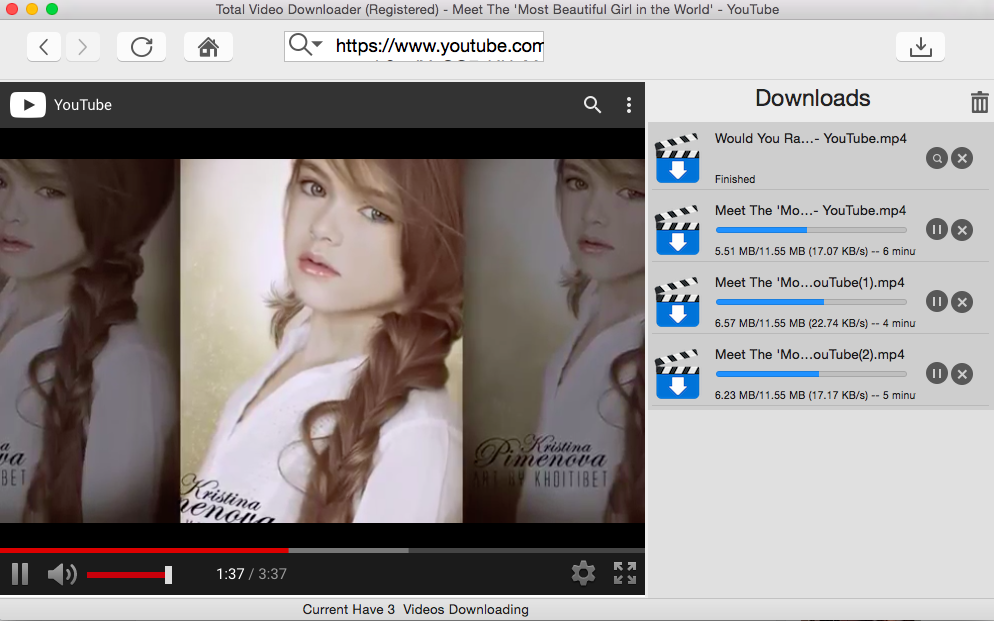
Rip Videos from YouTube on Mac with Total Video Downloader
Total Video Downloader is a free, easy-to-install application exclusively for Mac computers that helps users rip YouTube videos to Mac. Once you complete the downloading process, you open the app and paste the URL — it has an interface similar to the YouTube website for easy navigation.
Step-by-Step Guide
- Download and Install: Click the "Free Download" button above to download Total Video Downloader for Mac. Drag the app to your Applications folder to install.
- Open Total Video Downloader: Launch the application from your Applications folder. The interface resembles the YouTube website for intuitive use.
- Search or Paste URL: Use the built-in search option to find the video you want, or paste the YouTube video URL directly into the URL bar. You will notice a download button near the URL bar.
- Select Video Quality: A download dialog will appear. High Definition (HD) is the best quality, but it takes more storage space and longer download time. Moreover, not all videos are available in HD format — some older videos are only presented in standard definition.
- Start Download: Press "OK" and your video will start downloading. Expected time duration, status, and download speed will be displayed on the download bar — this depends on your Internet speed.
- Enjoy Offline: Finally, when the YouTube video is ripped completely to your Mac, you can navigate to the "Movies" folder (or your chosen download location), and you will see your video there. Double-click to open the video and verify it runs smoothly. You can now enjoy the video in offline mode!
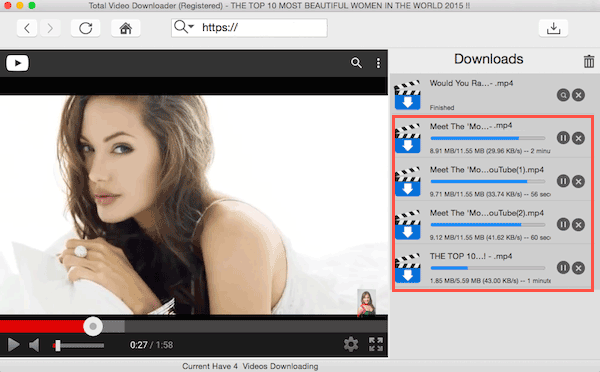
Total Video Downloader also supports batch downloading — you can download multiple YouTube videos at once, making it easy to build your offline video collection quickly.
Video Guide: How to Rip Video from YouTube on Mac?
For a visual walkthrough, watch our video tutorial that demonstrates the entire process of ripping YouTube videos on Mac using Total Video Downloader. The video covers installation, searching for videos, selecting quality, and batch downloading.
(Video tutorial coming soon — in the meantime, follow the step-by-step guide above!)
Supported Websites — Download Videos from 1000+ Sites
Total Video Downloader supports downloading videos from over 1000 video websites worldwide. Below are the major supported sites organized by region:
Supported Websites — Global
| Supported Websites — Global | ||||
|---|---|---|---|---|
| YouTube | VEVO | Vimeo | Dailymotion | Break |
| VideoBash | FunnyOrDie | Veoh | Metacafe | LiveLeak |
| PhotoBucket | StupidVideos | CBS News | YouKu | iQiyi |
| yinyuetai | Tudou | ABC News | BlipTV | Aol Video |
| eBaumsWorld | VideoJug | GodTube | Truveo | PPTV |
| PPS | video.sina | tv.sohu | kankan | Letv |
| Worldstarhiphop | MovieFone | MyVideo | M1905 | Howcast |
| ehow | answer | v.qq | XVideos | tube8 |
| Xhamster | RedTube | Xnxx | YouPorn | nuvid |
| Pornhub | xtube | drtuber | spankwire | 4tube |
| Beeg | porntube | alphaporno | bravotube | HardSexTube |
| Tube | TED | ABC | Movieclips | Comedycentral |
| PBS | MTV | CBS | Yahoo Screen | BBC |
| Cliphunter | Befuck | History | Playvid | Pornerbros |
| WatTV | Yahoo News | The NY Times | Discovery | IMDB |
| The Daily Show | Crunchyroll | BBC iPlayer | NBC | CollegeHumor |
| Lynda | Godtube | NFL | Foxnews video | Motherless |
| Thatvideosite | Youjizz | Crackle | Vporn | Mevio |
| Yahoo Music | VH1 | ESPN | ESPN Videos | CBS News |
| xVideos | Yourlust | TV | MLB | Veevr |
| Hellporno | Extremetube | Pornoid | Bravotub | Adobe TV |
| Globo | Twitchtv | GameSpot | IGN | GameTrailer |
| PC Gamer | Vube | Vioku | Mofosex | Movie2k |
| Hulu | More... | |||
Supported Websites — Japan Region
| Supported Websites — Japan Region | ||||
|---|---|---|---|---|
| NicoVideo | YouTube - JP | GYAO | Animefreak | 28tube |
| Fc2 | Moviefap | Slutload | Xxxstash | 4shared |
| Fileman | Moviesand | Spankwire | Yahoo | 6cn |
| Google Video | Myspace | Stagevu | Youjizz | ひまわり動画 |
| ニコニコ動画 | ももいろ動画 | ShowTime | IbiSpaint | Vid-DL |
| Woopie | EyeVio | Tokyoporntube | Tokyotube | More... |
Supported Websites — Korea Region
| Supported Websites — Korea Region | ||||
|---|---|---|---|---|
| Pandora.tv | Mncast | Freechal | Mgoon | Movist |
| Korea Film Center | Mnet | NATE | Daum TV | Diodeo |
| pullbbang | Naver | Korean Drama | More... | |
Supported Websites — China Region
| Supported Websites — China Region | ||||
|---|---|---|---|---|
| 腾讯视频 | 土豆视频 | 乐视网 | 新浪视频 | 网易公开课 |
| 百度视频 | 爱奇艺视频 | 搜狐视频 | 凤凰视频 | 风行网 |
| 酷6视频 | 56视频 | 迅雷看看 | PPTV | 视友网 |
| 哔哩哔哩 | 华数TV | 暴风影音 | 360影视 | CNTV (央视网) |
| 芒果TV(湖南卫视) | 播视网 | 中国蓝TV | 艺术中国 | ACFUN |
| 1905电影网 | 时光网 | 爆米花网 | 音悦台 | 豆瓣电影 |
| 爱拍游戏 | 酷狗MV | 品善网 | 酷米网 | 知音视频网 |
| 糖豆网 | 17173视频 | 第一视频 | 更多... | |
How to Download Videos from All Supported Video Sites
Total Video Downloader supports downloading videos from all the websites listed above. Click on any of the links below to learn how to download videos from specific sites on your Mac:
- YouTube Videos Downloader Mac
- Dailymotion Downloader Mac
- Mac Downloader for Vimeo Videos
- Download Beeg Videos Mac
- Download xHamster Videos Mac
- Xnxx Video Downloader Mac
- Blip TV Videos Downloader Mac
- eHow Video Downloader for Mac
- Free Break Videos Download Mac
- BBC Video Downloader Mac
- Mac CBS Video Downloader
- CTV Video Download Mac
- ESPN Video Downloader for Mac
- MLSsoccer Video Downloader Mac
- Download NBCSports Videos Mac
- How to Download NBC Video Mac?
- Pluzz Francetv Downloader Mac
- TED Videos, Episode Downloader Mac
- Download Telemundo Video Mac
- Tenplay Video Downloader Mac
- How to Save Vevo Videos Mac?
- Cbc.ca Video Downloader Mac
- Medici.tv Video Downloader Mac
- Capture Videos from LAOLA1.TV
- Liveleak Video Downloader Mac
- Metacafe Video Downloader Mac
- MTV Video Downloader for Mac
- Download Myspace Videos Mac
- NDR Video Downloader for Mac
- Download Netflix Videos on Mac
- SBS on Demand Downloader Mac
- Capture Veoh Videos Mac
- Wat.tv Downloader for Mac
- Download Yahoo Videos Mac
- Download CTVnews.ca Videos Mac
- Download Livestream Videos Mac
- Save Twitch Videos Mac
- Smotri Video Download Mac
- Capture RuTube Videos Mac
- Download Facebook Videos Mac
- Save Grooveshark Videos Mac
- Capture Photobucket Videos Mac
- Flickr Video Downloader Mac
- Download Godtube Videos Mac
- PBS Video Downloader Mac
- CNN Video Downloader for Mac
- Download Newsmax Videos Mac
- Save HTML5 Videos for Mac
- iFilm Video Downloader Mac
- Download Lynda Videos Mac
- Save Pornhub Videos Mac
- Capture WorldstarHipHop Videos
- Download YouPorn Videos Mac
- RedTube Video Downloader Mac
- NicoVideo Downloader for Mac
- Save Discovery Videos on Mac
- Crunchyroll Video Downloader Mac
- Download Goear Videos Mac
- Download Viki Videos Mac
- Tube8 Video Downloader Mac
- Aol Video Downloader Mac
- Download Motherless Videos Mac
- XVideos Downloader Free Download
- Download Cliphunter Mac
- Save HardSexTube Videos Mac
- Download Spankwire Videos Mac
- Slutload Downloader for Mac
- Download xTube Videos Mac
- Save GayTube Videos Mac
- IMDb Video Downloader Mac
- YouJizz Downloader for Mac
- Download Chicken8 Videos Mac
- Download Free Brazzer Video Mac
- Dare dorm Downloader Mac
- Udemy Video Downloader for Mac
- Ustream Video Downloader Mac
- Download Nuvid Videos Mac
- Tnaflix Downloader Mac
- Download DrTuber Stream Mac
- Download MyVideo Mac
- HBO Go Movies Downloader Mac
- Tumblr Video Downloader Mac
- Fake Taxi MP4 Download Mac
- Save 4Tube Videos to Mac
- Download 9GAG Videos Mac
- Bambuser Broadcasts Downloader
- Download BravoTube Mac
- HGTV Video Downloader Mac
- South Park Video Downloader Mac
- Pornerbros Downloader for Mac
- TruTV Video Downloader Mac
- Download Clipfish Videos Mac
- Download NowVideo Mac
- Download PutLocker Videos Mac
- Save NovaMov Videos Mac
- Download 9Jumpin Videos Mac
- Capture Megashare Videos Mac
- Download ABC iView Mac
- VideoWeed Video Downloader Mac
- Xfinity Movies Download Mac
- PornHD.com Downloader Mac
- Crackle Movies Downloader Mac
- Zedge Ringtones Downloader Mac
- Download YourUpload Videos Mac
- FC2 Videos Downloader Mac
- Global News Downloader Mac
- Instagram Video Downloader Mac
- JibJab Downloader Mac
- Globo Video Downloader Mac
- Download Twitchtv Game Mac
- Best Video Game Sites
- Rtmp Video Downloader Mac
- Capture Embedded Video Mac
- Download Vube Videos Mac
- Vioku Downloader Mac
- Download Video From Mofosex Mac
- Download Movie2k Movies Mac
- Hulu Video Downloader Mac
- Download BollyWood Movies Mac
- YouTube Videos to iPad4 Mac
- Save Videos to iPhone6s Mac
- Youtube to MP3 Download Mac
- Youtube Video Downloader MP4 Mac
- Download Videos from China Sites
- Download PandoraTV Video Mac
- Save YouTube Videos Mac
- YouTube Video Converter Mac
- Download Streaming Video Mac
- Download Video From YAM and PPS
- Download Japanese Anime Mac
- Korean Drama Downloader Mac
- 下载Xnxx视频教程
- YouTube動画をMacへダウンロード
Precaution before Downloading Videos
You can download videos for personal use only. You will face a serious penalty for copyright infringement by uploading videos and sharing videos with others without the video owner's permission.
Please respect content creators' rights and only download videos for offline personal viewing. Do not redistribute or use downloaded content for commercial purposes without proper authorization.
Frequently Asked Questions
Can I rip YouTube videos in 4K quality on Mac?
Yes, Total Video Downloader supports downloading YouTube videos in various resolutions including 4K and 8K, provided the original video is available in those formats. Simply select your desired quality when the download dialog appears.
Does Total Video Downloader work on M1/M2/M3 Macs?
Yes, Total Video Downloader is fully compatible with Apple Silicon Macs (M1, M2, M3 chips) as well as Intel-based Macs running macOS 10.8 and later.
Is it legal to rip YouTube videos on Mac?
Downloading YouTube videos for personal offline viewing is generally acceptable. However, redistributing, uploading, or using downloaded content for commercial purposes without permission violates copyright laws. Always respect content creators' rights.
Can I download multiple YouTube videos at once?
Yes! Total Video Downloader supports batch downloading. You can queue multiple videos and download them simultaneously, making it easy to build your offline collection.
What video formats are supported for download?
Total Video Downloader downloads videos in their original format (usually MP4 for YouTube). You can then use Total Video Converter for Mac to convert the downloaded videos to any format you need.