Total Video Player Pro for Mac — Best AVI, MKV, Blu-ray Player with Subtitles on macOS

Play AVI, MKV, Blu-ray discs, 4K ultra HD videos with subtitles on your Mac. Fully optimized for Intel Mac and Apple Silicon M1/M2/M3 Macs. Supports macOS Sequoia to Mavericks. Buy now, use immediately.

🛒 Buy Now — Pro $29.99 / Standard $9.99 ⬇️ Download Total Video Player Pro for Mac

Why Choose Total Video Player Pro for Mac?

The all-in-one video player for Mac that plays everything — AVI, MKV, Blu-ray, 4K — with full subtitle support on macOS.

🎬

Play Any Video Format on Mac

Total Video Player Pro for Mac plays virtually every video format: AVI, MKV, MP4, H264, MOV, FLV, WMV, 3GP, TS, MTS, M2TS and more. No need to install any codecs on your Mac — just drag, drop, and play.

📺

4K Ultra HD Playback on Mac

Smoothly play 4K ultra HD and 1080p videos on Mac without any lagging. Advanced decoding technology ensures vivid picture quality and fluid playback on both Intel and Apple Silicon Macs.

💬

Full Subtitle Support on Mac

The Pro version auto-matches subtitles to your videos on Mac. Supports SRT, SSA, ASS, SMI, VobSub and more subtitle formats. Customize font, color, and size of subtitles on your Mac easily.

💿

Blu-ray & DVD Player for Mac

Total Video Player Pro for Mac plays Blu-ray discs, DVDs, VCDs, SVCDs, CDs, and DVBs. Also plays Blu-ray ISO files and BDMV folders on Mac. Output up to 1080p high definition without quality loss.

🎵

Play Any Audio on Mac

Not just a video player — Total Video Player Pro for Mac also handles all audio formats: MP3, WMA, OGG, FLAC, ALAC, AAC, WAV, APE, and dozens more. Your all-in-one media player for Mac.

📋

Professional Playlist Manager on Mac

Create, save, and manage playlists on your Mac. Order, shuffle, and loop play your media files. Add or remove items from your playlist directly — perfect for continuous playback on Mac.

See Total Video Player Pro for Mac in Action

Powerful features that make it the best video player for Mac with subtitles.
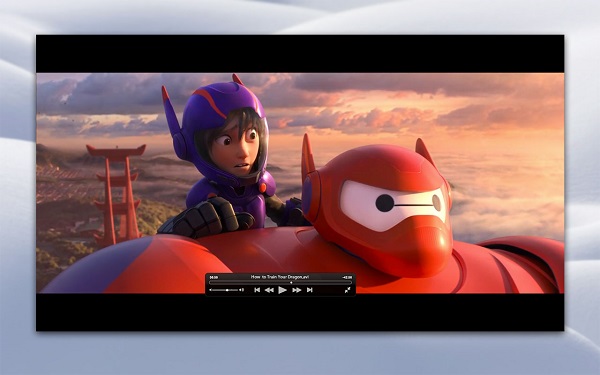
Total Video Player Pro for Mac — MKV and AVI player with subtitles

Excellent AVI & MKV Player for Mac with Subtitles

QuickTime can't play AVI or MKV files natively on Mac. Total Video Player Pro for Mac solves this completely — it serves as both an AVI Player for Mac and an MKV Player Mac, playing all AVI and MKV videos with subtitles without any limitation. Drag, drop, and play on your Mac. It's that simple.

Total Video Player Pro for Mac — supports all video and audio formats

Full Compatible with All Media Formats on Mac

Total Video Player Pro for Mac supports virtually every video and audio format: MP4, AVI, MKV, TS, MTS, M2TS, FLV, MOD, RMVB, WMV, FLAC, WAV, WMA, MP3, AAC, AIFF and hundreds more. With this all-in-one video player for Mac, you enjoy videos, audio, movies, and all media files without limit on macOS.

Total Video Player Pro for Mac — 4K ultra HD video playback

Smoothly Play HD & 4K Videos on Mac

Total Video Player Pro for Mac uses advanced decoding technology to avoid any video lagging. Smoothly play and enjoy any vivid 1080p HD and 4K ultra HD videos and movies on your Mac. Maximize efficiency and friendly user experience on macOS — that's our mission.
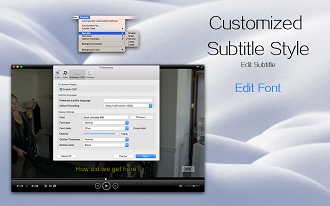
Total Video Player Pro for Mac — powerful subtitle functions

Powerful Subtitle Functions on Mac

Total Video Player Pro for Mac supports embedded subtitles in MKV and MP4 files, plus adding external subtitle files. The Pro version automatically loads subtitles matching your video filename. Customize subtitle font, text color, and size on Mac. Supports SRT, SSA, ASS, SMI, VobSub, and more.
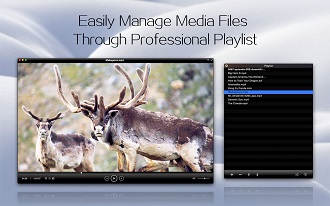
Total Video Player Pro for Mac — playlist manager

Easily Manage Media Files with Playlist on Mac

Total Video Player Pro for Mac provides a professional playlist to easily manage your media files. Order, shuffle, and loop play all media files in the playlist on Mac. Directly add or remove files. Save and upload playlists to enjoy your favorite media on Mac time after time.

Total Video Player Pro for Mac — powerful Blu-ray player

Powerful Blu-ray Player on Mac

Total Video Player Pro for Mac smoothly plays all media discs including Blu-ray, DVD, VCD/SVCD, CD, and DVB discs, as well as Blu-ray ISO files and BDMV folders on Mac. It outputs up to 1080p high definition quality without loss — a perfect Blu-ray player for Mac.

Standard vs Pro Version — Which One for Your Mac?

Both versions play all formats on Mac. The Pro version adds Blu-ray, auto-subtitles, and more.

Feature Standard ($9.99) Pro ($29.99)
Full-format playback on Mac
No ads on Mac
No bundling on Mac
Auto-matching subtitles on Mac Set folders first Fully supported
Play Blu-ray discs on Mac
Play DVD discs on Mac
Play VCD/SVCD on Mac
Play CD/DVB on Mac
Startup speed on Mac Average Fast
Ease of use on Mac Average Easy
Price $9.99 $29.99

How to Play Any Video on Mac with Total Video Player Pro

Three simple steps. No codecs needed on your Mac. No configuration required.

1

Drag Your Video File onto Total Video Player Pro on Mac

Simply drag any video file — AVI, MKV, MP4, FLV, or any format — onto Total Video Player Pro for Mac. No need to install codecs or convert formats on macOS. The Mac video player handles everything automatically.

2

Subtitles Auto-Load on Mac (Pro Version)

In the Pro version, subtitles are automatically matched to your video on Mac. External subtitle files (SRT, SSA, ASS, SMI) load seamlessly. Customize subtitle font, color, and size on your Mac for the perfect viewing experience.

3

Enjoy Your Video on Mac — 4K, Blu-ray, Any Format

Watch your video in stunning quality on Mac. Total Video Player Pro plays 4K ultra HD, 1080p, Blu-ray discs, DVDs, and every format smoothly on macOS. Pin the player window, manage playlists, and enjoy on your Mac.

Supported Formats on Mac by Total Video Player Pro

Total Video Player Pro for Mac plays virtually every media format on macOS.

Video Formats Supported on Mac

AVI, MKV, MPEG-1/2, DIVX (1/2/3), MPEG-4 ASP, DivX 4/5/6, XviD, 3ivX D4, H.261, H.263/H.263i, H.264/MPEG-4 AVC, Cinepak, Theora, Dirac/VC-2, MJPEG (A/B), WMV 1/2, WMV 3/WMV-9/VC-1, Sorenson 1/3, DV, On2 VP3/VP5/VP6, Indeo Video v3/4/5, Real Video 1/2/3/4, and many more on Mac.

Audio Formats Supported on Mac

MPEG Layer 1/2, MP3, AAC, Vorbis, AC3 (Dolby Digital), E-AC-3, MLP/TrueHD, DTS, WMA 1/2/3, FLAC, ALAC, Speex, Musepack/MPC, ATRAC 3, Wavpack, Mod (.s3m, .it, .mod), TrueAudio (TTA), APE (Monkey Audio), AMR, LPCM, ADPCM, QDM2/QDMC, MACE, and many more on Mac.

Subtitle Formats Supported on Mac

MicroDVD, SubRIP, SubViewer, SSA1-5, SAMI, VPlayer, Vobsub, Universal Subtitle Format (USF), SVCD/CVD, DVB, OGM, CMML, Kate, SubRip (.srt), Sub Station Alpha (.ssa, .ass), SAMI (.smi), VobSub (.idx/.sub), MPL2, and more on Mac.

Mac Users' FAQ — Total Video Player Pro for Mac

Everything Mac users need to know about Total Video Player Pro for macOS.

Does Total Video Player Pro work on Apple Silicon M1/M2/M3 Macs? +
Yes! Total Video Player Pro for Mac is fully optimized for Apple Silicon (M1/M2/M3) using native ARM64 code. It runs faster and more efficiently on Apple Silicon Macs than under Rosetta 2. Intel Macs are also fully supported with native x64 code on macOS. Whether you have a MacBook Pro M3 or an older Intel iMac, Total Video Player Pro runs natively.
Can Total Video Player Pro play AVI files on Mac? +
Absolutely. QuickTime cannot play AVI files natively on Mac, which is a long-standing frustration for Mac users. Total Video Player Pro for Mac serves as an excellent AVI Player for Mac — it plays all AVI videos on Mac with subtitles, removing all known AVI playback limitations. Just drag and drop your AVI file onto the player on your Mac.
Can Total Video Player Pro play MKV files on Mac? +
Yes. MKV (Matroska) files are not natively supported by QuickTime on Mac. Total Video Player Pro for Mac is a powerful MKV Player Mac that plays any MKV or HD MKV video on Mac OS X (including macOS Sequoia). Enjoy all your MKV movies with subtitles on your Mac without converting formats.
Can I play Blu-ray discs on Mac with Total Video Player Pro? +
Yes, the Pro version of Total Video Player Pro for Mac can play Blu-ray discs, Blu-ray ISO files, and BDMV folders on Mac. It outputs up to 1080p high definition quality without loss. The Standard version does not support Blu-ray playback on Mac — this is one of the key differences between the two versions.
How do subtitles work on Mac with Total Video Player Pro? +
The Pro version automatically matches subtitle files to your video on Mac — if the subtitle filename matches the video filename, it loads automatically. You can also manually add external subtitle files (SRT, SSA, ASS, SMI, VobSub). Customize subtitle font, text color, and size on your Mac. Embedded subtitles in MKV and MP4 files are also supported.
What's the difference between Standard and Pro versions on Mac? +
Both versions play all video and audio formats on Mac with no ads or bundling. The Pro version ($29.99) adds: Blu-ray/DVD/VCD/CD/DVB disc playback, auto-matching subtitles, faster startup, and easier interface. The Standard version ($9.99) is great for playing video files on Mac but doesn't support disc playback or auto-subtitles.
Which macOS versions does Total Video Player Pro support? +
Total Video Player Pro for Mac supports Mac OS X 10.9 (Mavericks) through the latest macOS Sequoia. It is compatible with iMac, MacBook, MacBook Air, MacBook Pro, MacBook Mini, and Mac Pro. Both Intel and Apple Silicon Macs are fully supported with native code.
Do I need to install codecs on my Mac to use Total Video Player Pro? +
No. Total Video Player Pro for Mac comes with all necessary decoders built-in. No need to install any additional codecs or plugins on your Mac. Just download, install, and play any video format on macOS immediately.

Ready to Play Any Video on Your Mac?

Join thousands of Mac users who trust Total Video Player Pro for playing AVI, MKV, Blu-ray, and 4K videos with subtitles on macOS. Buy now, use immediately on your Mac.

🛒 Buy Pro $29.99 — Use Immediately on Mac ⬇️ Download Total Video Player Pro for Mac